
OZON: товары, одежда, билеты
Internet Solutions LLCShopping
3.71.97K Reviews
- Version
- 19.32.0
- Installs
- 100.00M
- Age Rating
- Mature 17+
Screenshots

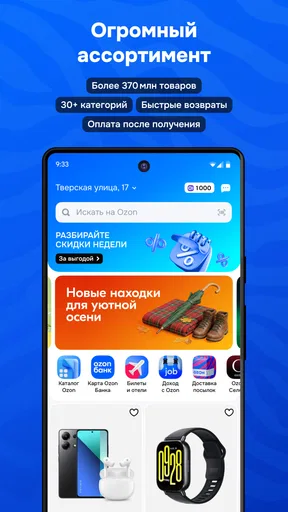
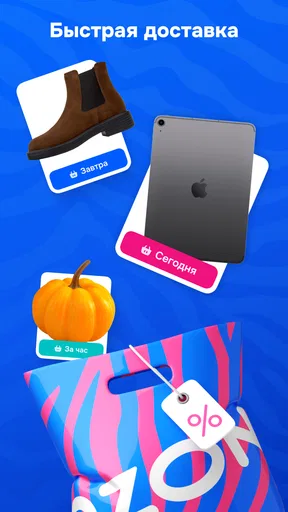
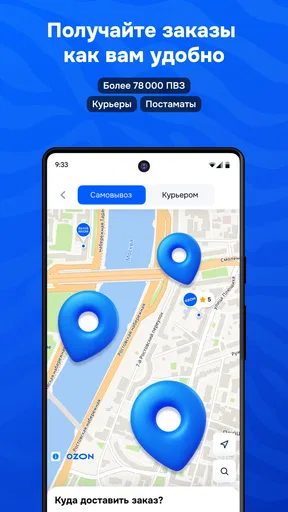
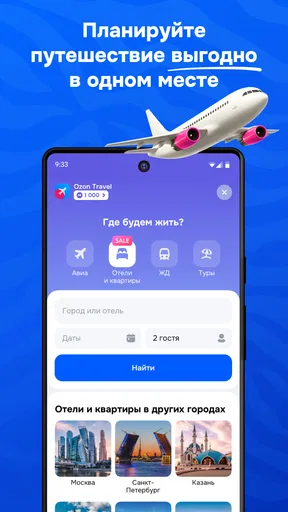
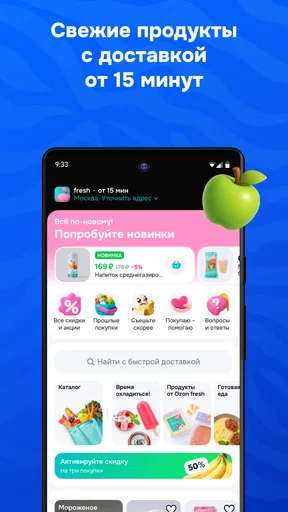


Our Review of OZON: товары, одежда, билеты
 Analysis by Appyee
I judge a shopping app not only by how much it carries, but by how easy it makes a real purchase when I’m short on time. OZON: товары, одежда, билеты brings a broad mix of shopping into one place, which can save me from hopping between specialist apps. That convenience is most useful when I already know what I need; when I’m browsing without a plan, the sheer range can take a little more effort to manage.
Where browsing can get frustrating
A large catalog is helpful until similar-looking listings start blending together. With clothing, I’d slow down before choosing: compare the item details, size information, photos, and seller-provided descriptions rather than treating a search result or discount label as the whole story. That small pause matters more for fit and material than it does for a basic household purchase.
Search is a useful starting point, but I wouldn’t assume the first result is automatically the best match. I narrow a broad query with more specific words, then scan several listings for differences that matter to me. If I’m shopping for a gift, for example, I check the exact variant and delivery estimate before committing, rather than relying on a product thumbnail that may represent several options.
For a first order, I’d also keep the basket focused. Mixing an urgent household essential, a clothing item I’m unsure about, and an event ticket can make it harder to think through each purchase on its own terms. I prefer to inspect the details of each item and its delivery information separately, especially when timing is important.
Simple checks before placing an order
The app is free, and Internet Solutions LLC is its developer. It has been available since December 28, 2011; the current version is 19.32.0, and the listed minimum operating-system requirement is 8.0. I’d check that my device meets that requirement and that the app is up to date if something looks or behaves differently than expected.
Before checkout, I review the delivery choice and address shown for the order, then check the item details one last time. Delivery speed can vary by product and destination, so I treat an estimate displayed for a particular purchase as more useful than a general expectation. The service’s appeal includes delivery that can start from one day, but I wouldn’t plan around that for every item without checking its own timing.
OZON is a substantial marketplace rather than a small, tightly curated shop: it has over 100 million installs, around 6.2 million ratings, and an average rating of 3.7. Those figures tell me many people use it, but they don’t guarantee that a particular listing or delivery will suit me. I still make the decision based on the product information and order details in front of me.
Recovering when a purchase goes off track
If a search, basket, or checkout step seems to stall, I avoid tapping repeatedly or starting a second order straight away. I first check whether the screen has finished loading, then revisit the basket and confirm whether the item is still there before proceeding. That simple check can prevent confusion about whether I have already taken an action.
If the problem continues, I’d close and reopen the app, check my connection, and try again after confirming I’m using the current version. For an order-related concern, I’d keep the relevant item and order details handy when contacting support. I wouldn’t assume a delayed screen means an order failed; checking the order status is a more sensible next step than placing it again.
When another option may suit you better
Compared with a single-brand store, OZON can be more convenient when I want to compare different kinds of goods in one shopping session. A specialist clothing retailer may be the better choice when I want a narrower edit and more focused garment guidance; a local grocery service may make more sense when freshness or a very specific delivery window is my priority. The right choice depends on what I’m buying, not just on how much appears in one catalog.
I’d also think carefully before using a broad marketplace for a purchase that depends on exact timing or a very particular fit. For those, I compare the listing and delivery details closely, and I’m willing to use another retailer if it offers a clearer match for that need. The convenience of having many categories together is real, but it doesn’t remove the need to check the individual purchase.
Diving into the Features
So, what's the deal with OZON: товары, одежда, билеты? Well, first things first, it's a Russian e-commerce app that's been catching a lot of eyes recently. You know how sometimes you need groceries, a new outfit, and maybe even a concert ticket, all at once? This app has got you covered.
I started my journey by exploring the clothing section. It's like a mini fashion show right on your phone. There are tons of brands, styles, and options. Whether you're into high-end fashion or just need something casual, it's all there. What’s more, the user interface is super intuitive. Even if you’re not tech-savvy, you’ll have no trouble navigating through the options.
Shopping Made Simple
Now, let’s talk about the shopping experience. Remember those clunky checkout processes that make you want to pull your hair out? Not here. The checkout is seamless, and they offer multiple payment options, so you can choose whatever suits you best. Plus, they frequently roll out discounts and deals, which is always a nice bonus.
Beyond Shopping: Tickets and More
One of the coolest features I found is the ticketing service. Planning a night out or looking for something fun to do? You can browse and purchase tickets to various events. It’s incredibly convenient, especially if you’re someone who loves to explore what’s happening around town.
And let’s not forget the grocery section. It’s perfect for when you’re too busy to hit the store. Just a few taps, and your groceries are on their way. They’ve got a wide variety of products, and delivery is pretty swift.
User Experience: Smooth and Easy
One thing I always look for in an app is how it performs under heavy use. Does it crash? Does it lag? Thankfully, OZON: товары, одежда, билеты runs smoothly. The app is well-designed, and I didn’t encounter any major bugs or issues. It’s compatible with both Android and iOS, so no worries if you’re team iPhone or Android.
The search functionality is also worth mentioning. You can find items using keywords, and the app filters results efficiently. No more endless scrolling or getting lost in a sea of irrelevant items.
Customer Service: A Reliable Companion
Okay, let’s get real. There are times when things don’t go as planned. Maybe an item isn’t up to your expectations, or there’s a delay in delivery. Having a reliable customer service team makes all the difference. I gave them a call just to test it out, and they were responsive and helpful, which gives you peace of mind when shopping.
Why You Should Give It a Try
In a nutshell, OZON: товары, одежда, билеты is a versatile app that caters to a wide range of needs. Whether you’re shopping for the latest fashion, organizing your pantry, or planning a fun weekend, it’s got your back. Plus, the convenience of having everything in one place is a game-changer.
If you’re in the market for a reliable and comprehensive shopping app, I’d definitely recommend giving OZON a shot. It’s like having a personal assistant in your pocket, ready to make life just a little bit easier.
A realistic way to use it day to day
Imagine I notice that a household staple is running low while I’m also looking for a practical gift. I can search for both in one app, compare the available options, and decide whether the convenience of combining my browsing outweighs the need to inspect each purchase carefully. If I’m also considering an event, I’d treat the ticket as a separate decision: confirm the event details and timing before buying, rather than adding it to the basket on impulse.
This is where a broad shopping app works best for me: it helps collect errands in one place, but it doesn’t mean every category should be handled with the same level of scrutiny. A repeat purchase is relatively straightforward; clothing, gifts, and time-sensitive plans deserve a closer look. I’d use saved search terms or a short note of what I’m comparing so I can return to the right options instead of restarting the search from scratch.
Who gets the most from a broad marketplace
I’d recommend trying it if you like comparing a range of everyday products and value having different shopping categories under one roof. It can also suit someone who already knows what they want and prefers to check several listings before choosing. Discounts can make browsing worthwhile, but I treat them as a reason to compare—not as proof that an item is the right purchase.
On the other hand, I’d skip it as my only shopping option if I need a specialist’s tightly organized selection, detailed in-person advice, or certainty about a particular product before ordering. Someone who prefers to handle produce themselves may be happier shopping locally, while a shopper who needs clothing to fit precisely may prefer trying it on. A large catalog gives choice, not a guarantee that every item will fit every need.
What the rating and age label tell me
The app is free to install, and its content rating is Mature 17+. I’d keep that age guidance in mind when deciding whether it’s suitable for a younger user, rather than assuming that a shopping app is automatically intended for every age group. The average rating of 3.7, alongside a large volume of user ratings, gives a broad impression of mixed experiences; it’s a useful signal to weigh, not a substitute for checking whether the app’s shopping approach suits me.
That distinction matters with marketplaces. One person’s experience can depend on the particular item, the seller information they relied on, and the delivery arrangement for that order. I wouldn’t read a single score as a prediction of my own result. I’d start with a modest, low-stakes purchase if I were new to the service, then decide whether the search and ordering flow feels comfortable enough for more involved shopping.
Making a better choice between listings
When two options look almost identical, I compare the details that affect the actual outcome: the selected size or variant, what the listing says is included, and the delivery estimate attached to the item. I also check that the basket still reflects the exact choice I intended. This is a small habit, but it is especially useful when product images show a family of colors or styles and the selectable option is easy to overlook.
I don’t let a discount rush me past those checks. A lower displayed price is only useful if the item itself, its timing, and its details match what I need. If the listing leaves me uncertain about a decisive detail, I’d choose a clearer alternative or wait rather than relying on guesswork. That approach takes a little longer, but it is more practical than trying to fix a purchase that could have been avoided.
When an app issue may be something else
Not every delay points to a problem with OZON. A weak connection can interrupt browsing or checkout, and a device that is low on available resources can make any app feel sluggish. If pages stop loading, I’d first test whether other apps or websites are also slow, then try again on a steadier connection. If only one listing is unavailable, I’d search for it again or check another option rather than assuming the whole service is broken.
For a purchase that matters, I separate a technical hiccup from an order concern. I check the order information in the app before repeating a checkout attempt, and I keep any relevant details ready if I need help. That gives me a clearer account of what happened and reduces the risk of creating confusion by making the same purchase twice.
My practical verdict
After weighing the convenience against the extra care a wide marketplace requires, I see OZON as a useful option for planned shopping across several categories—not a replacement for every specialist retailer or local shop. Its strongest case is having a range of goods, clothing, and tickets available in one shopping destination, while its main trade-off is that I need to judge each listing and delivery arrangement on its own.
If I were recommending it to a friend, I’d say to begin with a clear shopping list, check product and delivery details before paying, and use another option whenever a specialist service better matches the purchase. That is a realistic way to benefit from the app’s breadth without expecting convenience alone to solve every shopping decision.
Verdict
Strengths of OZON: товары, одежда, билеты
- Wide variety of products and categories.
- User-friendly interface for easy navigation.
- Secure payment options available.
- Frequent discounts and special offers.
- Fast and reliable delivery service.
Limitations of OZON: товары, одежда, билеты
- Limited customer service response time.
- Occasional app crashes reported by users.
- Some items have longer delivery times.
- Inconsistent stock availability on popular items.
- Language options are limited to Russian.
Other Releases by Internet Solutions LLC
View All
Ozon fresh
Food & Drink4.2
Similar Picks in This Category
View All
SHEIN-Shopping Online
Roadget Business PTE. LTD.4.8

Amazon Shopping
Amazon Mobile LLC4.4


Mercado Libre: Compras online
Mercado Libre4.8

Wish: Shop and Save
Wish US Holdings LLC4.7

Alibaba.com - B2B marketplace
Alibaba Mobile4.4
Frequently Asked Questions
What features does the OZON app offer to users?
The OZON app provides a comprehensive shopping platform where users can browse a wide range of products, including clothing, electronics, and groceries. Additionally, it offers ticket purchasing for events and travel. The app also includes features like personalized recommendations, secure payment options, and customer reviews to enhance the shopping experience.
Is the OZON app available for both Android and iOS?
Yes, the OZON app is available for download on both Android and iOS platforms. Users can download it from the Google Play Store or the Apple App Store. The app is designed to be user-friendly, ensuring a seamless shopping experience across different devices.
How does the OZON app handle shipping and delivery?
The OZON app offers various shipping options to cater to different needs, including standard and express delivery. Users can track their orders in real-time within the app. OZON strives to ensure timely deliveries and provides customer support to address any shipping concerns or issues that might arise.
What payment methods are accepted on the OZON app?
OZON offers a variety of secure payment options to ensure convenience and safety for users. These include credit and debit cards, online payment systems, and digital wallets. The app employs robust security measures to protect users’ financial information during transactions.
Does the OZON app offer any customer support features?
Yes, the OZON app provides comprehensive customer support. Users can access a help center directly through the app, where they can find answers to common queries or contact support for assistance. The app also offers chat support for real-time issue resolution, ensuring a smooth user experience.
